Action 1: Prevent Propagation of Incorrect Routing Information
The IXP implements filtering of route announcements at the Route Server based on routing information data (IRR and/or RPKI). Based on the outcome of the validation process, the invalid announcements are filtered in accordance with the IXP's published policy. IRR-based filtering is applied on updates from peers, and strict filtering of RPKI invalids in the export phase. As IRR and RPKI information are completely independent, the filtering strategy can be modified.
1-1 Import filtering
IXPs should perform import filtering on routes received from each peer in their RS infrastructure. Import filtering ensures that prefixes coming from a certain client are put in the routing information base (RIB) only after having been compared with IRR registered policies for that peer. Thus, only routes originating from the client AS or from one of its registered customers are accepted into the RIB. In any case, sanity checks should be applied to filter out bogon and martian prefixes.
In order to support input filtering, each client should specify, along with its own AS number, an AS-SET macro containing all its direct customers that are going to be announced on the exchange. Then a set of filter rules is generated by looking at registered routes for the aforementioned AS-SET (client + customers). Each route is filtered by matching the exact netmask and origin AS.
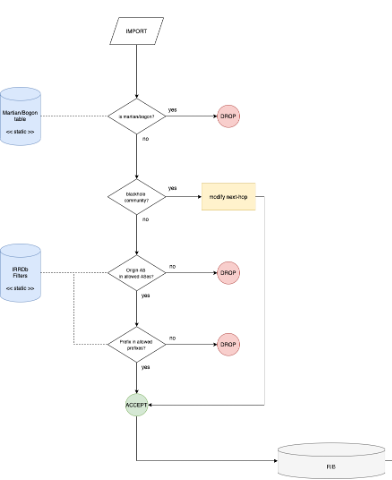
MANRS recommends the following steps for import filtering:
- Check if the IP prefix received from the member/customer is a Martian/bogon.
If the prefix updated by a peer is a Martian/bogon prefix, drop it; else go to step 2.
- Check if the update contains the BGP blackhole community
If the update received has the BGP blackhole community, the Route Server changes the next hop of the update with the one of the server dummies and the prefix is accepted and stored in the RS's RIB; else go to step 3.
- Check if the updated prefix origin AS belongs to the set of allowed ASes
The set of allowed ASes for a given peer is made of its own AS plus any additional AS listed as a customer in a registered AS-SET. If the origin AS of the updated prefix belongs to the allowed set, then go to step 4; else reject the update.
- Check if updated prefix belongs to the set of allowed prefixes
The set of allowed prefixes for a peer is built by expanding any AS included in the corresponding set of allowed ASes for the peer. For any AS in the set, ROUTE objects having that AS as an origin are fetched.
If the updated prefix exactly matches one of the prefixes included in the set of allowed prefixes, then the prefix is added to the RIB; else it is rejected.
1-2 Export filtering
An IXP Route Server infrastructure should implement export filtering on outgoing advertisements. Before the prefixes stored in Route Server's RIB are exported to the peers, export filters are applied. This process applies on a per-neighbor basis.
IXP members should define their policy using RPSL objects in IRR and specify the prefixes they want to send other IXP participants (export policy) as well as from which participants they want to receive updates (import policy).
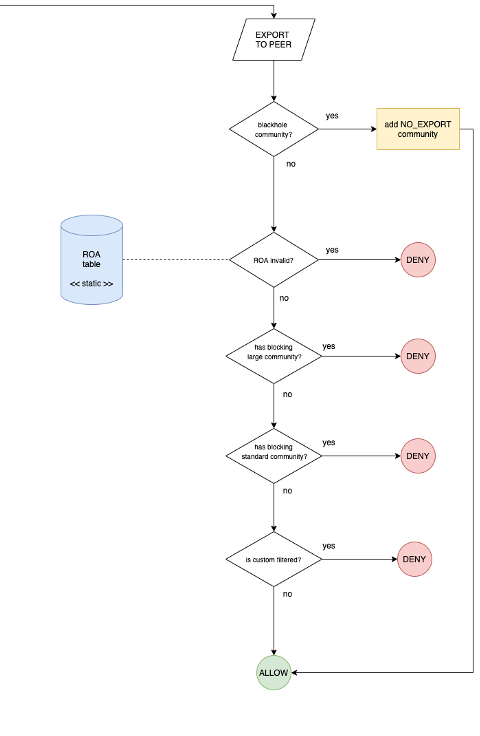
MANRS recommends the following steps for export filtering:
- Check if the update has blackhole BGP community
If the update has the blackhole BGP community, it applies the "no-export" BGP community (which tells the peers who will receive the update not to propagate it) and the prefix is announced to the neighbor. If no blackhole BGP community is found for this advertisement, proceed to the next step.
- Check if there is a covering ROA in RPKI Validator
If the result is an invalid announcement, the update is not propagated to the neighbor; else proceed to the next step.
- Check if the update has a BGP blocking large community
If the update has a BGP blocking large community for the specific neighbor, the prefix should not be exported to the neighbors; else proceed to the next step.
- Check if the update has a BGP blocking standard community
If the update has a BGP blocking standard community for the specific neighbor, it should not export the prefix to the neighbor; else proceed to the next step.
- Check if the update is custom filtered
If the update is custom filtered for the specific neighbor, it should not export the prefix to the neighbor; else it is announced to the neighbor.
1-3 Examples: Configuring RPKI filtering
Here is an example of how to configure BIRD - a commonly used route server - with Resource Public Key Infrastructure (RPKI) to Router Protocol, or RTR Protocol, to filter invalid routes.
RTR, defined in RFC 6810 and RFC 8210, is a protocol that delivers validated prefix origin to routers. BIRD 2.0 supports RTR.
Below is an example of how to configure BIRD to drop invalid routes:
roa4 table r4;
roa6 table r6;
	protocol rpki {
		debug all;
		roa4 { table r4; };
		roa6 { table r6; };`
 	    # Replace the below with your RPKI validator address
		remote "192.0.2.100" port 8282;
		retry keep 5;
		refresh keep 30;
		expire 600;
	}

	filter peer_in_v4 {
		if (roa_check(r4, net, bgp_path.last) = ROA_INVALID) then
		{
			print "Ignore RPKI invalid ", net, " for ASN ", bgp_path.last;
			reject;
		}
		accept;
	}

	protocol bgp {
		debug all;
		local as 65000;
		neighbor 192.0.2.11 as 65001;
		ipv4 {
			import filter peer_in_v4;
			export none;
		};
}
Here is an example of how to configure openBGPd to drop INVALID routes (static table, no RTR support). After importing the rpki-client generated configuration:
roa-set {
	203.119.88.0/23 maxlen 24 source-as 187
	2001:dd8:7::/48 maxlen 48 source-as 187
	2401:680::/32 maxlen 32 source-as 715
}
deny to any ovs invalid
NOTE: the use of "to" in the deny clause (instead of "from") allows you to keep visibility of all INVALID prefixes without reflecting them to all peers (through the command bgpctl show rib ovs invalid).
IXPs using a Route Server to facilitate multilateral peerings should use it to validate received route announcements from a peer and subsequently filter them to other peers. Special purpose cases, such as research projects, are out of scope for this requirement.
Validation is usually done by checking BGP announcements against RPKI data (ROA objects or a validated cache) and second IRR data (by resolving the AS-SET object). It is also common to check the announcements against "bogons" or "martians" (IP prefixes as defined in RFC1918, RFC5735, and RFC6598; ASNs in the AS-PATH as defined by RFC5398, RFC6793, RFC6996, RFC7300, RFC7607).
1-4 Bogon filtering examples
The below examples are borrowed from: https://bgpfilterguide.nlnog.net/ and cover various router operating systems and how to filter bogon networks:
Cisco
prefix-set BOGONS_V4
	0.0.0.0/8 le 32,
	10.0.0.0/8 le 32,
	100.64.0.0/10 le 32,
	127.0.0.0/8 le 32,
	169.254.0.0/16 le 32,
	172.16.0.0/12 le 32,
	192.0.2.0/24 le 32,
	192.88.99.0/24 le 32,
	192.168.0.0/16 le 32,
	198.18.0.0/15 le 32,
	198.51.100.0/24 le 32,
	203.0.113.0/24 le 32,
	224.0.0.0/4 le 32,
	240.0.0.0/4 le 32
end-set
!
route-policy BGP_FILTER_IN
	if destination in BOGONS_V4 then
		drop
	endif
end-policy
JunOS
policy-statement reject-bogon-prefixes {
	term reject-bogon-prefixes-v4 {
		from {
			route-filter 0.0.0.0/8 orlonger;
			route-filter 10.0.0.0/8 orlonger;
			route-filter 100.64.0.0/10 orlonger;
			route-filter 127.0.0.0/8 orlonger;
			route-filter 169.254.0.0/16 orlonger;
			route-filter 172.16.0.0/12 orlonger;
			route-filter 192.0.2.0/24 orlonger;
			route-filter 192.88.99.0/24 orlonger;
			route-filter 192.168.0.0/16 orlonger;
			route-filter 198.18.0.0/15 orlonger;
			route-filter 198.51.100.0/24 orlonger;
			route-filter 203.0.113.0/24 orlonger;
			route-filter 224.0.0.0/4 orlonger;
			route-filter 240.0.0.0/4 orlonger;
		}
		then reject;
	}
	term reject-bogon-prefixes-v6 {
		from {
			route-filter ::/8 orlonger;
			route-filter 100::/64 orlonger;
			route-filter 2001:2::/48 orlonger;
			route-filter 2001:10::/28 orlonger;
			route-filter 2001:db8::/32 orlonger;
			route-filter 2002::/16 orlonger;
			route-filter 3ffe::/16 orlonger;
			route-filter fc00::/7 orlonger;
			route-filter fe80::/10 orlonger;
			route-filter fec0::/10 orlonger;
			route-filter ff00::/8 orlonger;
		}
		then reject;
	}
}
OpenBGPD
deny from any prefix 0.0.0.0/8 prefixlen >= 8
deny from any prefix 10.0.0.0/8 prefixlen >= 8
deny from any prefix 100.64.0.0/10 prefixlen >= 10
deny from any prefix 127.0.0.0/8 prefixlen >= 8
deny from any prefix 169.254.0.0/16 prefixlen >= 16
deny from any prefix 172.16.0.0/12 prefixlen >= 12
deny from any prefix 192.0.2.0/24 prefixlen >= 24
deny from any prefix 192.88.99.0/24 prefixlen >= 24
deny from any prefix 192.168.0.0/16 prefixlen >= 16
deny from any prefix 198.18.0.0/15 prefixlen >= 15
deny from any prefix 198.51.100.0/24 prefixlen >= 24
deny from any prefix 203.0.113.0/24 prefixlen >= 24
deny from any prefix 224.0.0.0/4 prefixlen >= 4
deny from any prefix 240.0.0.0/4 prefixlen >= 4
Bird
define BOGON_PREFIXES = []
	[
	0.0.0.0/8+, # RFC 1122 'this' network
	10.0.0.0/8+, # RFC 1918 private space
	100.64.0.0/10+, # RFC 6598 Carrier grade nat space
	127.0.0.0/8+, # RFC 1122 localhost
	169.254.0.0/16+, # RFC 3927 link local
	172.16.0.0/12+, # RFC 1918 private space
	192.0.2.0/24+, # RFC 5737 TEST-NET-1
	192.88.99.0/24+, # RFC 7526 6to4 anycast relay
	192.168.0.0/16+, # RFC 1918 private space
	198.18.0.0/15+, # RFC 2544 benchmarking
	198.51.100.0/24+, # RFC 5737 TEST-NET-2
	203.0.113.0/24+, # RFC 5737 TEST-NET-3
	224.0.0.0/4+, # multicast
	240.0.0.0/4+
	]; # reserved

function reject_bogon_prefixes()
	prefix set bogon_prefixes;
	{
		bogon_prefixes = BOGON_PREFIXES;
		if (net ~ bogon_prefixes) then {
			print "Reject: Bogon prefix: ", net, " ", bgp_path;
			reject;
		}
	}

filter transit_in {
	reject_invalids();
	reject_bogon_asns();
	reject_bogon_prefixes();
	reject_long_aspaths();
	reject_small_prefixes();
	reject_default_route();
	honor_graceful_shutdown();
	accept;
}

filter ixp_in {
	reject_invalids();
	reject_bogon_asns();
	reject_bogon_prefixes();
	reject_long_aspaths();
	reject_transit_paths()
	reject_small_prefixes();
	reject_default_route();
	honor_graceful_shutdown();
	accept;
}
Here is a sample script to fetch bogons from Cymru for use in OpenBGPD:
#!/usr/bin/env python3
import sys
import urllib2
import re

ver = sys.argv[1]

url = "<https://www.team-cymru.org/Services/Bogons/fullbogons-ip>" + ver + ".txt"

contents = urllib2.urlopen(url).read()

for line in contents.splitlines():
	if re.match("^#",line):
		continue
	else:
		print("deny from any prefix " + line)
Here is a sample script to fetch bogons from Cymru for use in BIRD:
#!/usr/bin/env python3

import sys
import urllib2
import re

ver = sys.argv[1]

url = "<https://www.team-cymru.org/Services/Bogons/fullbogons-ip>" + ver + ".txt"

contents = urllib2.urlopen(url).read()

for line in contents.splitlines():
	if re.match("^#",line):
		continue
	else:
		print(line + ",")
1-5 Checking that RPKI validation works correctly
Once configured, check that RPKI route origin validation (ROV) works correctly. To perform this task, use the MANRS IXP validation tool. It is an open-source project and the tool is freely available from Github: [https://github.com/manrs-tools/MANRS-IXP-validation-tool].
The purpose of this tool is to validate RPKI filtering on IXP route servers by performing ROV on the routes accepted by the route server. The tool validates the routes seen in an exported MRT RIB dump, through the [Alice-LG] API, or [Bird's Eye] API, against RPKI data, to see whether the RIB contains any RPKI invalid routes. If communities are used to tag invalid routes (for instance, to be filtered out on egress), they can be specified, so they will be treated as positive ROV.